Cirkt demo: from drawings to a live job in 90 seconds
Dashboards
The whole job on one screen, live from the field.
AI takeoff built for MEP drawings
If it’s in the set, we can take it off. Send scanned or vector PDFs, drawing sets, schedules and spec books, plus images, Office files and CAD exports. Your brief tells us what matters, so there’s no template to fill in. The list below is what we’re asked for most, but it isn’t a limit. Tell us exactly what to count, pull or flag, and we’ll confirm scope and quote it before any work starts.
Don’t see what you need? Describe it in your brief →The cooling coil valve CCV-AHU2 is one line on the valve schedule on sheet M-604. It comes back as one row of data, with its valve G669C and actuator AFX24-MFT-X1, and becomes one line on the AHU-2 checklist in your tracker, ready for your crew to sign off.
| TAG | SERVICE | VALVE | ACTUATOR |
|---|---|---|---|
| PHV-AHU2 | Pre-heat coil | G646C | AFX24-MFT-X1 |
| CCV-AHU2 | Cooling coil | G669C | AFX24-MFT-X1 |
| HCV-AHU2 | Heating coil | G667C | AFX24-MFT-X1 |
Each row becomes one line on a unit’s checklist, with its part numbers, for your crew to sign off.
Equipment schedules
AHU, RTU, pump and fan schedules with every column kept intact.
Device and fixture counts
Counts by drawing, level or area, ready for takeoff and bills of materials.
Panel and circuit data
Panel schedules and circuit directories, pulled row by row.
Spec requirements
Submittal and commissioning requirements gathered into a clean list.
Scans and markups
Photocopied sheets and hand-marked clouds are read, not skipped.
Why a human reviews every takeoff
AI is fast, but a takeoff you have to re-check isn’t saving you time. Every Cirkt takeoff is spot-checked by a human reviewer against your drawings before it reaches you. Anything ambiguous comes back to you as a question, not a guess.
Live project tracking your MEP crews will actually use
Takeoff gets the job moving. The Live Project Tracker keeps it moving. It runs on the same verified data as your takeoff, so crews work from a clear list of what to install, test and sign off, and leadership sees real progress without chasing anyone for it.
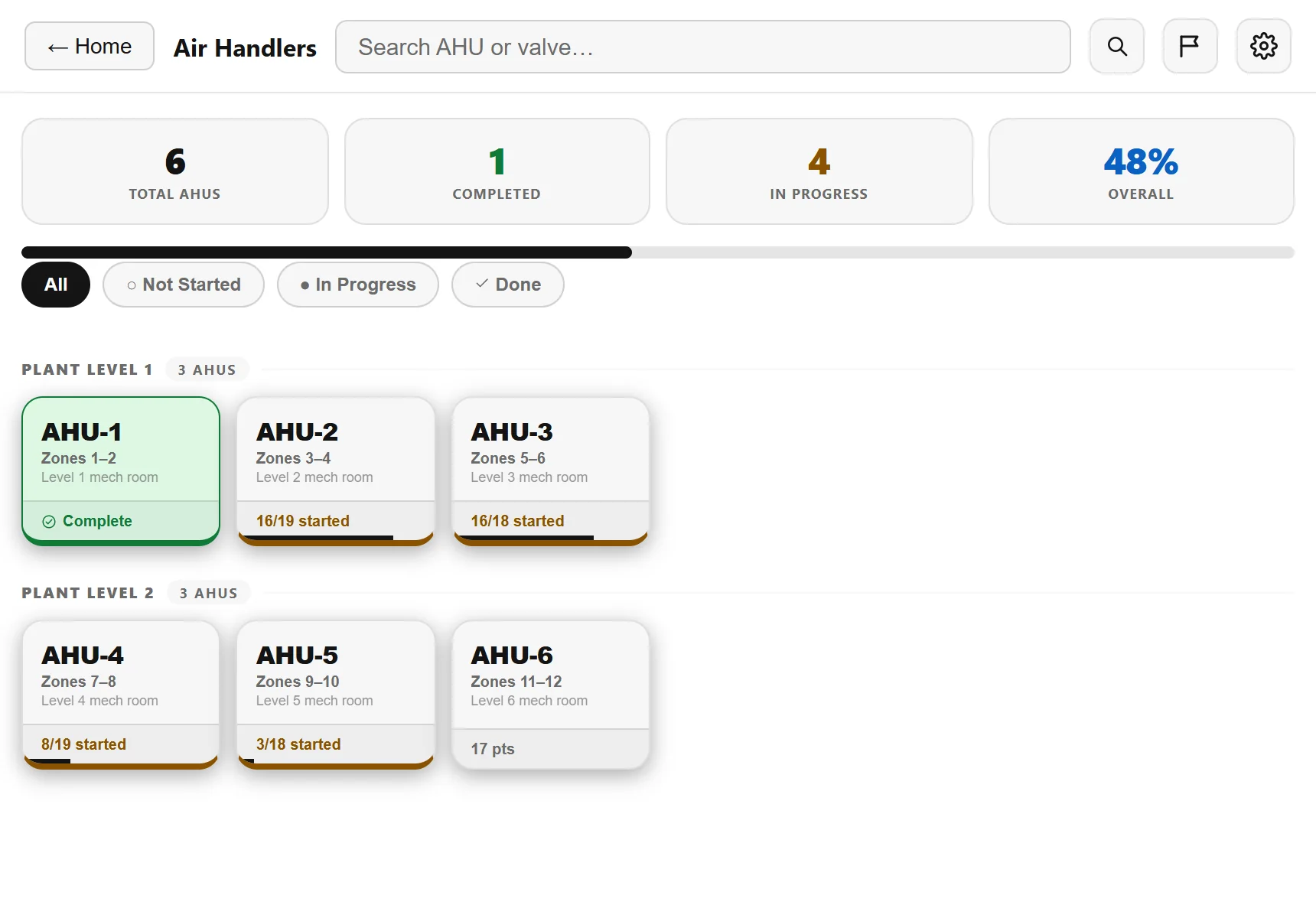
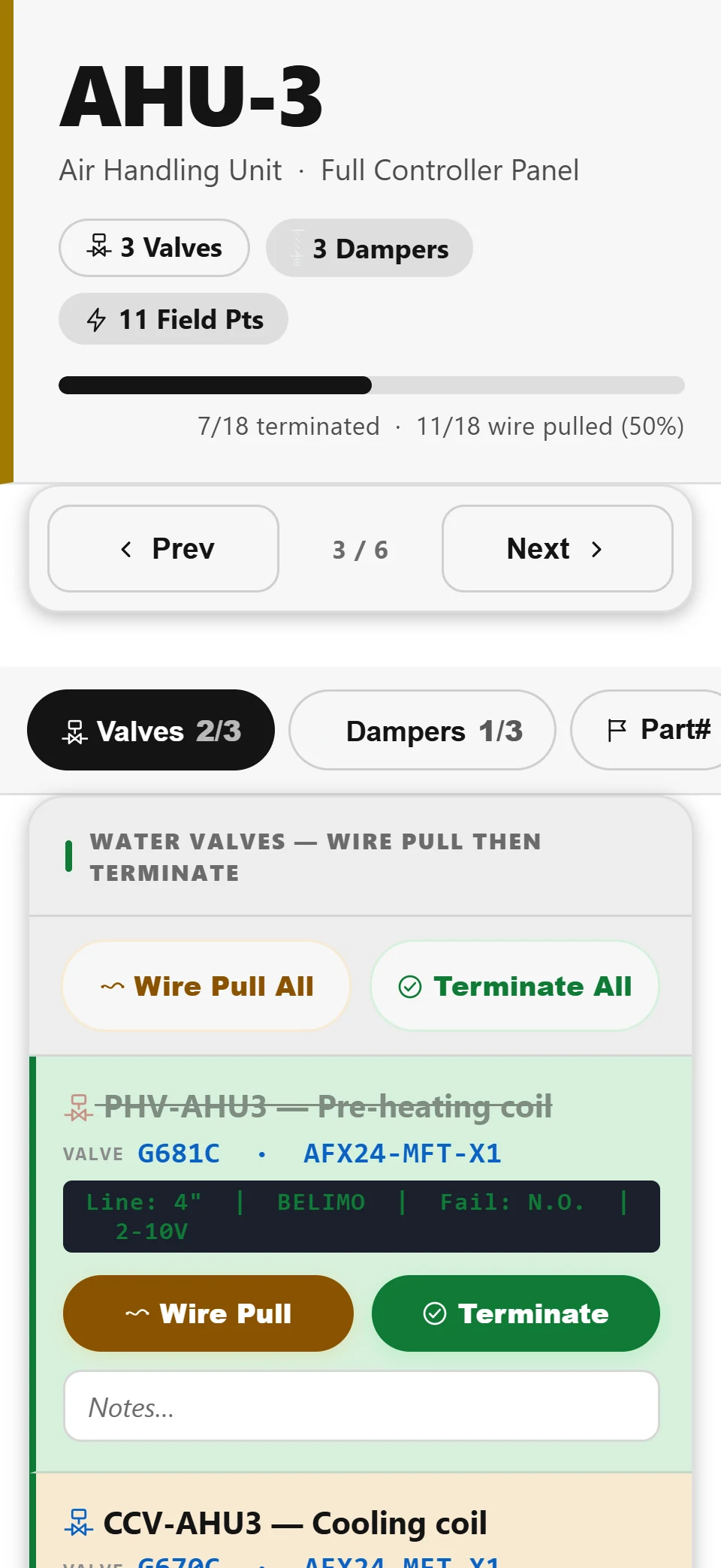
- Open one link on any phone. No app, no accounts, no logins.
- See exactly which units and points are left, instead of paging through drawings and spreadsheets on site.
- Tap to sign off. The update reaches the office right away.
- Live percent complete by unit type, area or team.
- Planned versus actual progress, with a forecast completion date once field data is logged.
- Less time chasing updates and more time acting on them.
One dataset, no drift
The schedule the office is reading and the checklist the field is working from can’t drift apart, because they come from the same verified data. No crew logins, works on any device, and you can switch the link off any time.
Have an MEP drawing set that needs a takeoff?
Tell us about your firm and what you’re working with.
- 01A person reads your request and replies.
- 02You get an invite link, set a password, and your firm gets its own space.
- 03Upload a set, write a short brief, and hand it off.